Artificial intelligence. It’s the latest craze sweeping the technological landscape. With the release of ChatGPT-3, there has been a huge appetite for A.I in everyday use. Microsoft, due to their stake in OpenAI, has been leading the charge with integrating A.I into their products through the Co-Pilot family of products. These are currently in preview, and range from Microsoft 365, to Visual Studio, as well as the Power Platform. This article will explore what Co-Pilot looks like currently in the Power Platform products, as well as some thoughts on where it might go.
Co-Pilot in PowerApps
Microsoft has deployed Co-Pilot to PowerApps, in order to help end-users build PowerApps much faster, as well as make it easier on Citizen Developers to get features and functionality out to their organizations with as little code as possible. This has really been the goal of all products in the power Platform since they were released, but Microsoft is hoping that Co-Pilot can truly help users in a much fast and more efficient way. Let’s take a look at what Co-Pilot currently offers in PowerApps:
Natural Language prompts to allow App Creation
Describe your App, and let Co-Pilot build it for you. This is the end goal for Co-Pilot in Microsoft’s eyes, but you have to remember that this technology is still in Preview, and is still very limited on what it can deliver. Yes, you can describe what you want you app to do, and Co-Pilot will scaffold data, as well as an App for you. But the functionality still has some caveats.


First of all, when Co-Pilot scaffolds a data structure for you, it will do so only in Dataverse. So, if you’re a customer who either doesn;t have Premium Power Apps licensing or Dynamics licensing, this becomes a bit of a non-starter. In addition, it will only scaffold one Table when it deigns the App. So if the PowerApp you want to create contains any sort of complexity, or you need a 1:N or N:N data structure, Co-Pilot won’t get you all the way there.
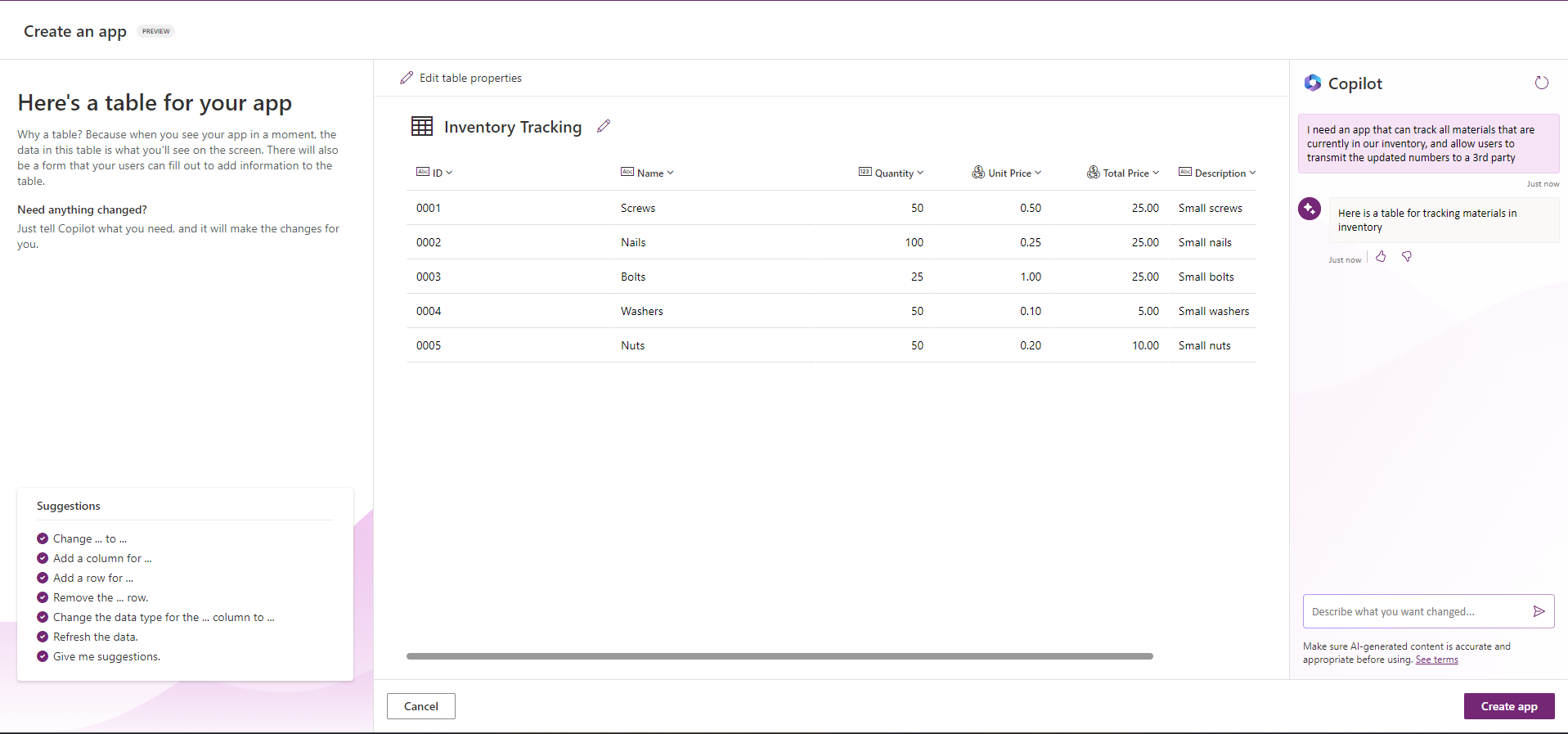
With that being said however, Co-Pilot does do a very good job at accelerating the design of your data by offering typical columns you may want to include when you first describe your app. In addition, it will also include some sample data to get you started. You can also give Co-Pilot prompts for columns and column types you want added (i.e. Choice, Number, text), and Co-Pilot does provide suggestions for you to help you craft the prompts.
When you’ve completed your data structure, Co-Pilot will then provision a PowerApps Canvas App to allow you to interact with the Table you created. While this is a nice feature, Microsoft isn’t necessarily breaking new ground here, as PowerApps has allowed you to create a Canvas App against a Data source for a number of years now. It’s essentially provisioning a predefined Canvas Apps Template that performs CRUD (Create, Read, Update, Delete) actions and letting you customize it to your needs.

This definitely can help Citizen Developers accelerate their Power App creation process, but only in very narrow scenarios and only for Citizen Developers who have simple use cases. That being said, I can certainly see this functionality expanding over time. Providing users the ability to scaffold more Data Sources (i.e. SharePoint and SQL), and allowing more input into the PowerApp that will be created (i.e. defining custom templates, allowing prompts for Canvas App design), will eventually turn this into a real game changer for Citizen Developers.
Co-Pilot Control in PowerApps Canvas Apps
Microsoft has also included a Co-Pilot Control that Citizen Developers can embed into their Canvas Apps that can allow end-users to query Data in a Canvas App. This is very similar to the functionality that has existed in PowerBI for the Past several years.

I think this will eventually be a very useful component in PowerApps, but my initial hands-on usage of it felt sorely lacking. The support for any real data source is limited in size (I couldn’t even get it to query any of my test SharePoint lists of Dataverse tables), so I had difficulty even providing any real use cases around this so far. The concept however, is definitely strong, and I’m hoping to see Microsoft continue to improve this area.

My gut reaction to Co-Pilot in PowerApps so far, is that Microsoft is trying to set themselves apart as a leader in the A.I space by pushing out features as quickly as possible. While this gives an initial underwhelming reaction to Co-Pilot in PowerApps, if they are investing as much as I think, we’ll continue to see rapid improvements and features in the coming months/years.
Co-Pilot in Power Automate
With Co-Pilot in Power Automate, some of the same concepts apply as we saw in Co-Pilot for PowerApps, which is the ability for Citizen Developers to quickly create and edit Power Automate flows.

Creating Power Automate Flows with Co-Pilot
It’s as simple as describing the type of Workflow you want Power Automate to create and Co-Pilot provides a starting point for end users to begin. In my test case, I described my workflow as:
“When a new Item is created in the SharePoint test List, an approval should be started and then send approvals to our sales managers, and then send a reminder every 24 hours until the approval is complete. When the Approval is finished, it should update the SharePoint Test List, and then email each approver with the outcome of the approval.”
Co-Pilot will then offer suggested actions and conditions to try and meet the description that was presented to it. One nice feature is that it will offer multiple selections, however it certainly has some short comings.

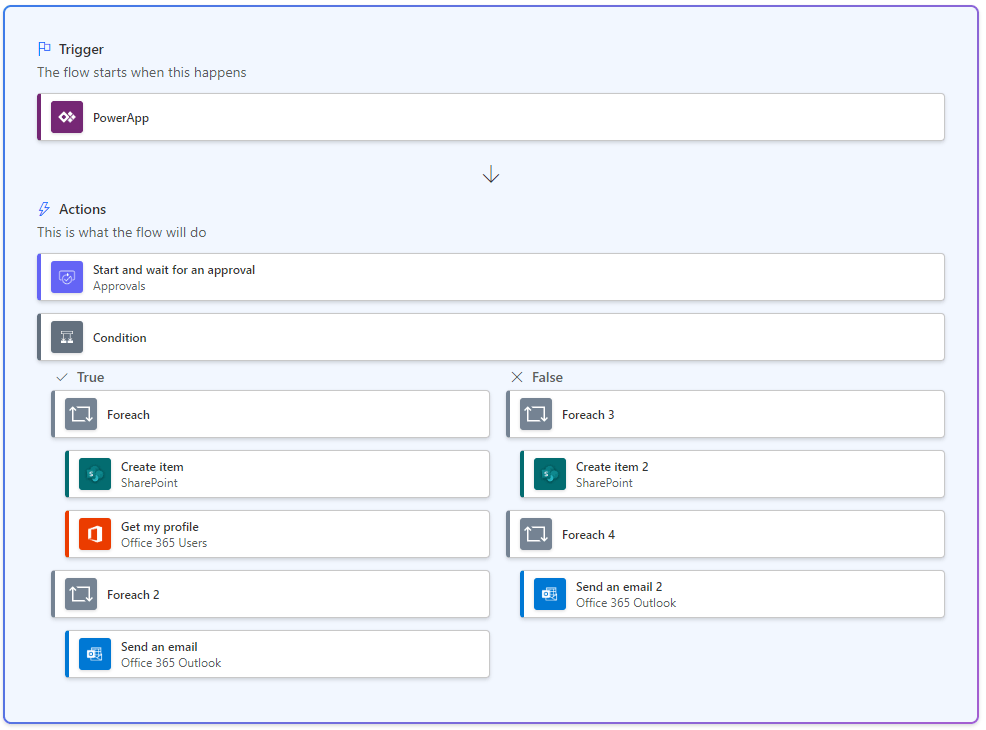
Some of the biggest issues comes when you finally create the flow. In my examples above, you will see conditions and ForEach blocks, but when you finally go to edit the flow, these will be empty, as Co-Pilot doesn;t understand the data you’re trying to work with (So, if a Citizen Developer doesn’t understand what should go here either, it’s a big problem):

Another issue, is that Co-Pilot may not understand how to accomplish certain things in Power Automate yet. For Example, I asked Co-Pilot to create a workflow that could send a reminder every 24 hours, but it couldn’t understand how to do that in Power Automate. (Don’t feel bad Co-Pilot, most developers have the same problem! 😂😂😂)
While Co-Pilot can help you scaffold your Actions in an accelerated manner, Developers will still need to understand the data and actions that will be needed to truly make the workflow successful as well as efficient.
Editing Power Automate Flows with Co-Pilot
In addition to creating flows, Co-Pilot can also assist with Editing them:

When Editing with Co-Pilot, you’re presented with a very different editing experience then what you may be used to. Co-Pilot streamlines the actions presented to the end user, and relies on using prompts to add/remove actions to a workflow.

Starting with a simple workflow, I asked Co-Pilot to modify my actions with this example:

Normally, I would expect and Approval action, possibly a condition, and then a SharePoint Update Item Action. This is what I got back from Co-Pilot:
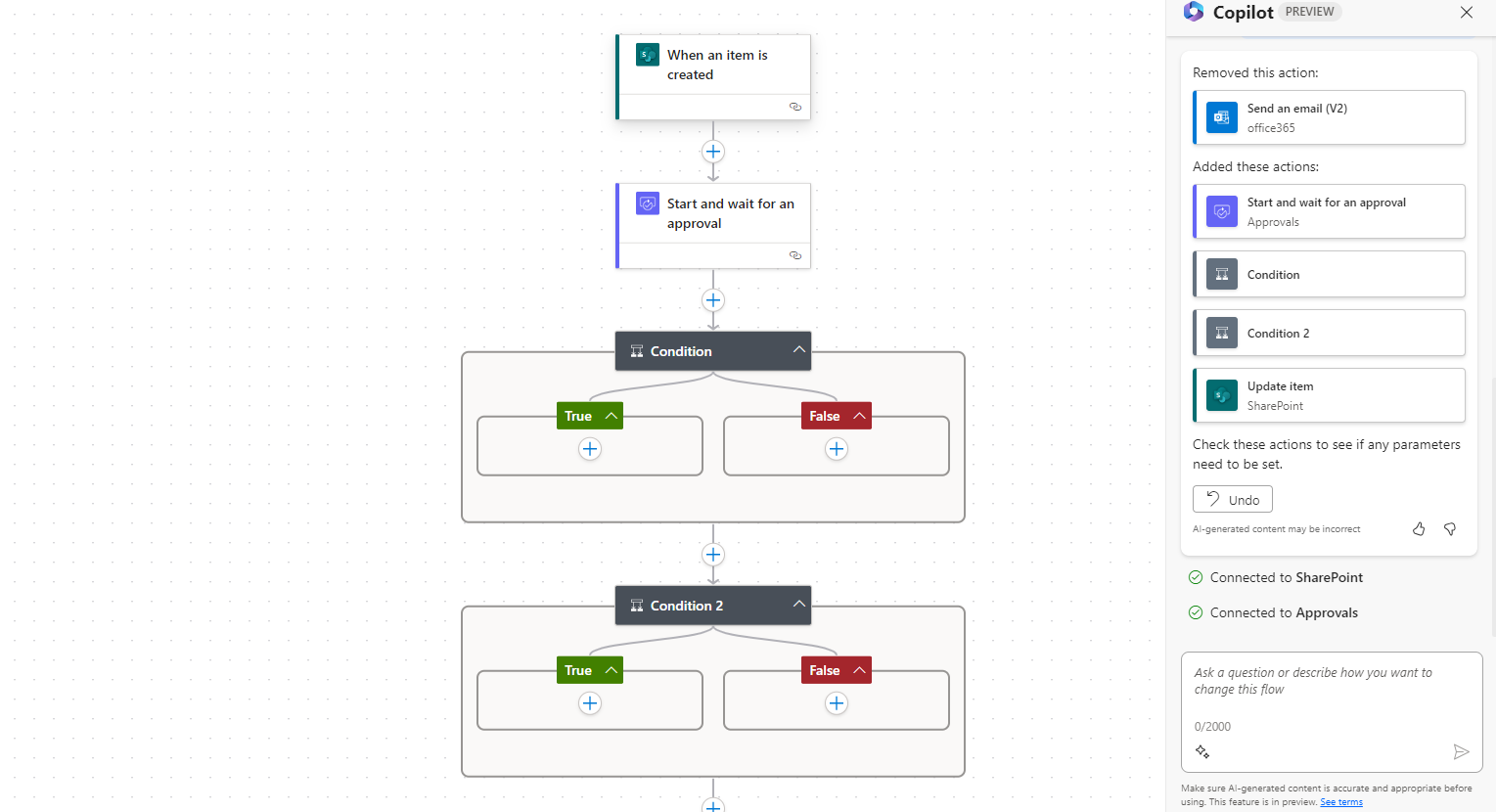
Ok, first it removed my Send an email action and it added 2 conditions as well for some odd reason. While I like the look and feel of the streamlined editing inerface, the A.I portion still needs some work.
So, I asked it to add somethign I though was relatively simple. Let’s see what happens when I try something more complex. I gave Co-Pilot a description of a use case I was working on while writing this to see how it handled it:
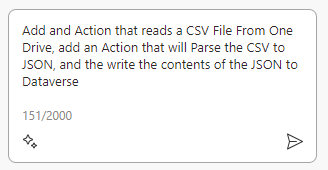
What I got in response from Co-Pilot, was what I would call, umm, a bit underwhelming:

Now, that example was me being specific on what I was looking for. It sent back essentially what I asked it do, but it a numbered format 😂😂😂😂. Maybe I was being too specific, what if I ask it in a much more basic fashion?

Ok, now it’s just sending me back custom development suggestions to write through the Dataverse API, which has absolutely nothing to do with power Automate. So, this may need some context trimming around it before it’s ready for Citizen Developer use, otherwise they may start setting up Azure Subscription to accomplish things 😂😂😂😂.
As with PowerApps, Co-Pilot in power Automate still needs plenty of work, but there’s still a lot of potential if they keep refining towards a more user friendly experience.
Co-Pilot in Power Virtual Agents
Co-Pilot in Power Virtual Agents is designed to help Bot authors easily generate topics, as well as summarize data sources using OpenAI to provide relevant answers to Topics.
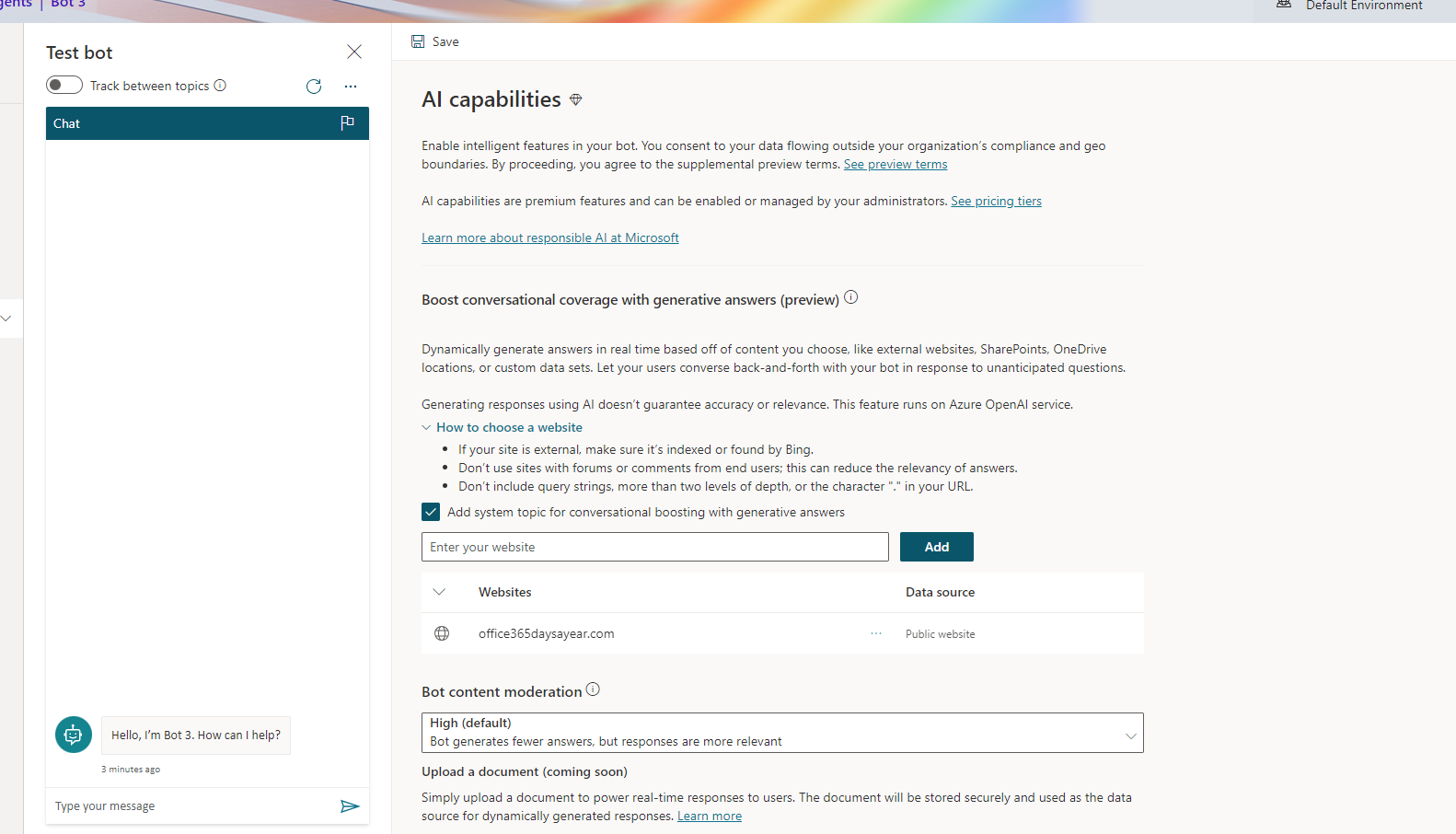
When creating a new Bot, you have the option to provide certain websites (Public, One Drive, SharePoint) to the configuration of the bot. This will allow it to query these websites and generate appropriate answers based on what the end user is asking the bot. These generative answers can be directly inserted into a topic, or can be set as a system fallback, to ensure that users can get the information they need.
In addition, Power Virtual Agents now includes the ability to generate topics through the use of Prompts. So, you can setup a new topic through a prompt to allow your developers to quickly generate the topics they want to produce, and you can insert the ability to provide generative answers directly into your topic.


Co-Pilot in Power Pages
Co-Pilot in power Pages is designed to assist developers with generating text and generating forms to capture Data. It also provides the ability to create a chatbot to help end users when utilizing the Power Pages site.
The Form generation has a slightly similar feel that PowerApps has when generating an app. You simply add your prompt to Co-Pilot and it will return a suggested data structure based on what you described.

Once the data structure has been recommended, you can then use Co-Pilot to suggest changes to the data structure based upon your needs:
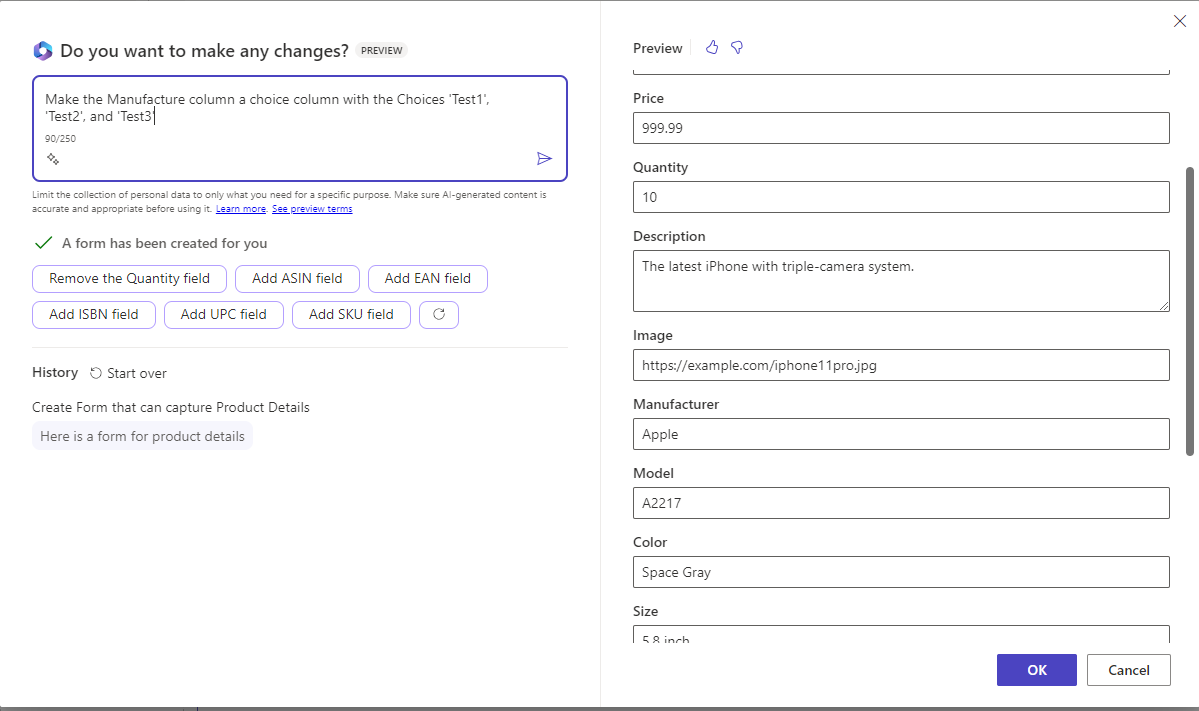

Once the Form is finalized, it’s then added to the page, and you can then customize the overall look and feel to meet your UX/UI design guidelines for the site.
Co-Pilot in Power Pages can also help you generate descriptive text to add to your site, to help speed the process of generating pertinent information for users. When you add a text block, there will be a Co-Pilot option, which will then pull up a description block.

Co-Pilot will then generate the text based on the prompt.
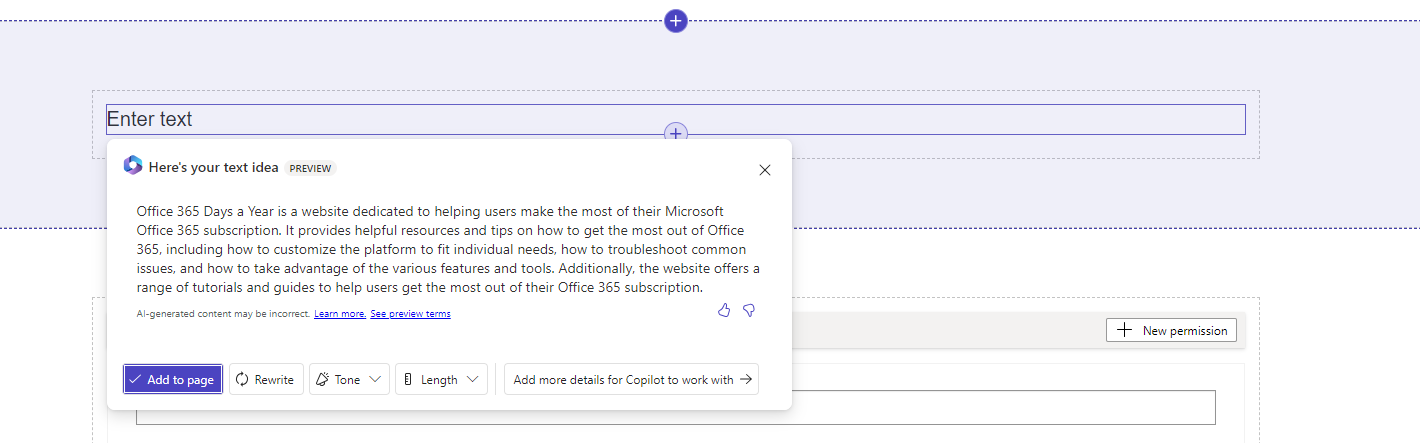
Before you add it to the page, you have the option to rewrite the text, Change the overall tone of the text, or make in longeror shorter:

I can certainly see Co-Pilot being a huge accelerator for Power Pages, as producing information content can be quite time consuming, and with the ability to pull in information from external data sources, this can be a huge game changer for these sites.
In Conclusion
Co-Pilot is new and still very raw. That being said, this is a product that is in preview and it’s the first iteration of these tools. The fact that Microsoft has been able to push these technologies to these products as quickly as they have shows me that these feature will play a very significant role in the future of the Power Platform, and I’m excited to see the evolution of them going forward. Please check out some of my other articles to take a deeper dive into the products and as always, please feel free to reach out to me at jo.karnes@centricconsulting.com

 Office - 365 Days a Year
One Comment Add yours